
Meta Ads क्या है और बिजनेस के लिए क्यों जरूरी है?

Meta Ads (पहले Facebook Ads) एक paid digital advertising platform है जो आपको Facebook, Instagram, Messenger, WhatsApp और Audience Network पर विज्ञापन चलाने की सुविधा देता है। यह Meta Platforms Inc. का एडवरटाइजिंग सिस्टम है, जिसे Meta Ads Manager से मैनेज किया जाता है।
Meta Ads के मुख्य Platforms
Facebook – सबसे बड़ा social network
Instagram – visuals और reels के लिए best
Messenger – direct chat-based ads
WhatsApp – business messaging ads
Audience Network – third-party apps और websites पर ads
बिजनेस के लिए Meta Ads क्यों जरूरी है?
1. Targeted Advertising
Meta Ads आपको demographics, interests, behaviors, location, age, gender और यहाँ तक कि past interactions के basis पर सही audience तक पहुँचने देता है। यानी आपका ad सिर्फ उन्हीं लोगों को दिखता है जो आपके product या service में interested हैं।
2. Cost-Effective Advertising
आप budget control कर सकते हैं—छोटे बिजनेस भी ₹100-200/day से शुरू कर सकते हैं। Bid adjustment और automated optimization (जैसे Advantage+) से आप कम खर्च में ज्यादा results पा सकते हैं।
3. Wide Audience Reach
3 billion+ users तक पहुँच = огром market opportunity। चाहे आप local shop चलाते हों या national brand, Meta Ads से आप अपनी desired audience को easily reach कर सकते हैं।
4. Multiple Ad Formats
Image Ads
Video Ads
Carousel Ads (multiple products एक साथ)
Reels Ads
Story Ads
Lead Ads (बिना website के leads collect करना)
5. Leads और Sales Generation
Meta Ads lead generation, website traffic, app installs, messages, और direct sales जैसे multiple objectives support करता है। Retargeting और Custom Audience से आप उन लोगों को फिर से target कर सकते हैं जिन्होंने पहले आपके brand के साथ interact किया था।
6. Easy Tracking और Analytics
Meta Ads Manager में real-time analytics, conversion tracking, और ROI measurement के tools मिलते हैं। आप देख सकते हैं कि कितने लोग ad देख रहे हैं, click कर रहे हैं, और purchase कर रहे हैं।
7. Automation और AI Features
Advantage, Advantage+, और AI-powered optimization से Meta automatically best audience, placements, और creatives find करता है। इससे beginners को भी professional results मिलते हैं।
किन Businesses के लिए Best है?
E-commerce stores (products sell करना)
Local businesses (restaurants, salons, clinics)
Service providers (coaches, consultants, agencies)
Apps और SaaS (downloads और sign-ups)
Content creators (followers और engagement बढ़ाना)
शुरुआत कैसे करें?
Meta Business Suite या Meta Ads Manager account बनाएं
Campaign objective choose करें (awareness, traffic, leads, sales, etc.)
Audience define करें (age, location, interests)
Budget और bid set करें
Ad creative बनाएं (image, video, copy)
Launch करें और performance track करें
Meta Ads में कम बजट से ज्यादा ग्राहक कैसे पाएँ?
कम बजट में भी Meta Ads से अच्छे results पाने के लिए smart strategy, सही targeting, और continuous optimization की जरूरत होती है। यहाँ complete guide दी गई है:
1. Minimum Viable Budget सेट करें
शुरुआत में बहुत कम बजट (₹100-200/day) से काम नहीं चलेगा क्योंकि algorithm learning phase से बाहर नहीं निकल पाता।
Recommended Daily Budget (India):
Lead Generation: ₹500-700/day (minimum), ₹1,000-2,000/day (optimal)
Sales/E-commerce: ₹500/day (minimum), ₹1,000-2,000/day (recommended)
Formula: आपका Target CPL × 7 conversions/day = Minimum Daily Budget
(Example: अगर CPL ₹80 चाहिए → ₹80 × 7 = ₹560/day minimum)
2. Budget Allocation Strategy (50:30:20 Rule)
कम बजट में भी सही distribution से ज्यादा results मिलते हैं:project
3. Single Ad Set Strategy (छोटे बजट के लिए)
अगर बजट genuinely small है (<₹1,000/day), तो एक ही ad set चलाएं:
इससे algorithm को enough data मिलता है और learning phase जल्दी exit हो जाता है।
4. Right Objective Choose करें
कम बजट में Purchase optimize करने की बजाय पहले Add to Cart या Initiate Checkout optimize करें:
ये events ज्यादा frequently होते हैं
Algorithm जल्दी 50-event threshold cross कर लेता है
बाद में purchase data आने पर Purchase optimization पर switch करें
5. High-Converting Creatives बनाएं
Creative ही सबसे बड़ा factor है जो cost कम और conversions ज्यादा करता है:
Best Performing Creative Types (India):
UGC-style Reels (15-30 sec): Real customer product hold करके camera से बात करे
Problem → Fix Hook: पहले 3 seconds में pain point बताएं, फिर solution दिखाएं
Founder Story: “मैंने ये brand इसलिए शुरू किया क्योंकि…” (trust build होता है)
Before/After: Skincare, fitness, home decor के लिए best
Unboxing + First Impression: Real customer का reaction film करें
Creative Tips:
Text overlays use करें (60% users बिना sound के video देखते हैं)
First 3 seconds में clear CTA visually दिखाएं (‘thumb-stop moment’)
6. Smart Targeting Strategies
a) Broad Targeting + Advantage+
Interest stacking avoid करें
Meta को algorithm से best audience find करने दें
b) Lookalike Audiences
c) Retargeting Audiences (सबसे सस्ता CPA)
Website visitors (7/14/30 day)
Video viewers (50%+ watched)
Instagram engagers
Cart abandonersproject
Retargeting से 30-60% lower CPA मिलता है compared to cold traffic।
d) Negative Audiences / Exclusions
7. Ad Scheduling Optimize करें
Peak user activity times पर ads चलाएं (जब audience most likely act करे)
Audience window shorten करें (last 14 days instead of 60 days)
8. Scaling Strategy (20% Rule)
जब ad perform करने लगे, तो budget बढ़ाने का सही तरीका:startupbricks+3
हर 72 hours (3 days) में maximum 20% increase करें
Example: ₹500/day → ₹600/day (not ₹1,000/day directly)
3 days wait करें, results check करें, फिर से increase करें अगर stable है
गलतियाँ जो avoid करें:
Budget एकदम से double करना (learning phase reset हो जाता है)
Campaigns को बार-बार stop और restart करना (सारा learning खत्म)
₹200/day से कम से start करना (algorithm कभी learn नहीं कर पाता)
9. Testing Budget (शुरुआती 2-4 weeks)
Testing phase के लिए:rajeshrnair+2
Total testing budget: ₹15,000-₹30,000 (2-4 weeks)
इससे enough data मिलता है कि कौन से audiences और creatives perform कर रहे हैं।
10. Conversion Tracking Properly Setup करें
Conversions API use करें (true cost per conversion दिखता है, not just clicks)
Proper tracking से आप real ROAS और CAC measure कर सकते हैं
11. Cheaper Placements Use करें
Retargeting के लिए cheaper placements use करें
12. Frequency Monitor करें
Quick Action Plan (कम बजट शुरुआत के लिए)
Day 1-7: ₹500-700/day से एक ad set चलाएं (2-3 creatives)
Day 8-14: Winning creative identify करें, budget 20% increase करें
Day 15-30: Retargeting campaign add करें (30% budget)
Month 2: Lookalike audiences test करें, scaling शुरू करें
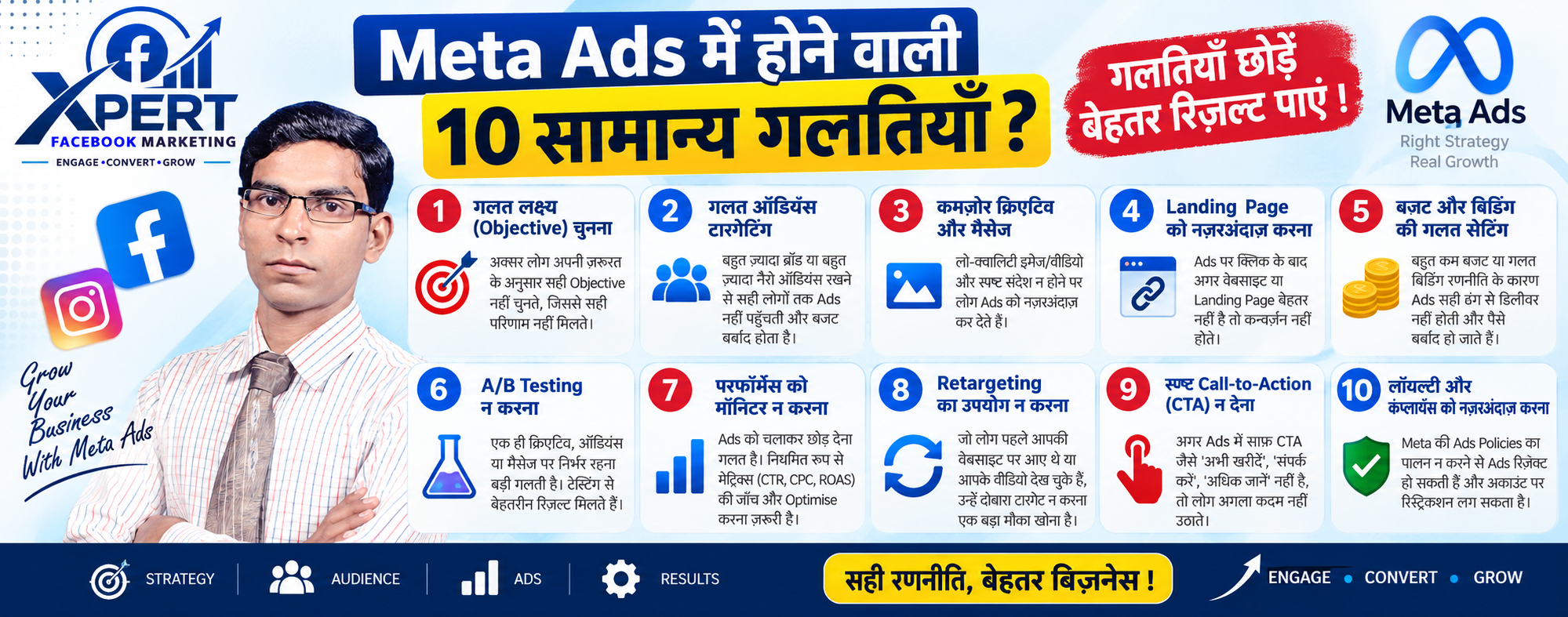
Meta Ads में होने वाली 10 सामान्य गलतियाँ
Meta Ads पर पैसे खर्च करने के बाद भी results न मिलने के पीछे अक्सर यही 10 गलतियाँ होती हैं जो beginners और small businesses regularly करते हैं:
1. Wrong Campaign Objective चुनना
सबसे common mistake: business goal और campaign objective match नहीं करना
गलतियाँ:
Sales चाहिए लेकिन Traffic या Engagement objective use करना
Leads चाहिए लेकिन Reach या Brand Awareness campaign चलाना
सिर्फ likes और comments के पीछे भागना (vanity metrics)
सही तरीका:
Sales चाहिए → Sales/Purchase objective
Leads चाहिए → Leads objective
Website visits चाहिए → Traffic objective
2. Boost Post का गलत इस्तेमाल
छोटे businesses अक्सर Boost Post button से ads चलाते हैं जो limited features देता है।
Problems:
Limited targeting options
No proper conversion tracking
25-40% higher CPCs
Vanity metrics (likes, comments) optimize होते हैं, not sales या
Solution: हमेशा Meta Ads Manager से proper campaigns बनाएं।
3. Targeting Too Narrow या Too Broad
दोनों extremes से problems होते हैं:
Too Narrow (Audience <50,000):
Costs skyrocket हो जाते हैं
Algorithm को enough data नहीं मिलता
CPM बहुत महंगा हो जाता है
Too Broad (बिना किसी strategy के):
Solution: Start with broad + smart creatives, फिर data के basis पर refine करें।
4. Learning Phase में Changes करना
नए campaigns को 3-7 days से पहले edit या stop करना।
क्या होता है:
हर edit से learning phase reset हो जाता है
Algorithm को फिर से start से learn करना पड़ता है
आप पैसे दे रहे हैं Meta को “start over” करने के लिए
सही तरीका:
5. Too Many Ad Sets एक साथ चलाना
एक campaign में 5-10 ad sets launch कर देना।
Problems:
Budget useless small bets में split हो जाता है
हर ad set learning phase में फंस जाता है
Solution: Maximum 3 ad sets per campaign (छोटे बजट के लिए 1-2 ही काफी हैं)।
6. Bad Creatives और No Creative Testing
बोरिंग, forgettable creatives use करना और उन्हें हफ्तों-महीनों तक चलाना।
Signs of Bad Creative:
Stock photos use हो रहे हैं
Clear CTA नहीं है
Same creative महीनों से run हो रहा है (ad fatigue)
Solution:
UGC-style videos (15-30 sec) use करें
हर 3-4 weeks में creative refresh करें
7. No Conversion Tracking या Wrong Tracking
Pixel install न करना, Conversions API न लगाना, या wrong events track करना।
Problems:
आपको पता नहीं चलता कि कौन से ads actually sales या leads दे रहे हैं
सिर्फ clicks और impressions दिखते हैं, not real business results
Solution:
Meta Pixel website पर install करें
Conversions API setup करें
Proper UTM parameters use करें
8. Wrong Landing Page या No Landing Page Strategy
Paid traffic को homepage या broken landing page पर भेजना।
Common Mistakes:
Homepage पर भेजना (no focused conversion path)
Slow loading pages
Mobile-unfriendly design
Ad promise और landing page content match नहीं करना
No clear CTA on landing page
Solution:
Dedicated landing page बनाएं (single goal, single CTA)
9. No Retargeting Strategy
सिर्फ cold audience (नए लोग) को target करना, warm audience को ignore करना।
क्यों गलत है:
95-97% first visit पर convert नहीं करते
Warm audience (website visitors, video viewers, engagers) सबसे सस्ता convert होता है
Solution:
TOF (Top of Funnel): Cold audience – 50-60% budget
MOF (Middle of Funnel): Engaged users – 20-30% budget
10. No Clear Offer या Weak Value Proposition
Ad में clear offer नहीं होना या value proposition weak होना।
Signs:
Clicks आ रहे हैं लेकिन conversions नहीं
CTR low है
ROAS poor है

Facebook Ads Campaign के प्रकार और उनका उपयोग
Facebook (Meta) Ads में 6 main campaign objectives होते हैं जो आपके business goal के हिसाब से choose किए जाते हैं। सही objective चुनना सबसे important step है—गलत objective = पूरा budget waste।
6 Facebook Ads Campaign Objectives
1. Awareness Campaign (जागरूकता अभियान)
Purpose: अपने brand को maximum लोगों तक पहुँचाना और brand recognition बनाना।
कब use करें:
नया brand launch कर रहे हैं
Brand को market में introduce करना है
Maximum reach चाहिए (जितने ज्यादा लोग देखें)
Local business की awareness बढ़ानी है
Optimizes for:
Reach (कितने unique users ने देखा)
Impressions (कुल कितनी बार दिखा)
Brand Recall
Key Metrics:
CPM (Cost Per 1,000 Impressions)
Reach
Frequency (औसतन कितनी बार एक user ने देखा)
Best Ad Formats:
Image Ads
Video Ads
Stories Ads
Budget Allocation: 20-30% of total ad spend
Example: नया restaurant खुला है, तो पहले awareness campaign चलाएं ताकि locality के लोगों को पता चले।
2. Traffic Campaign (वेबसाइट ट्रैफिक अभियान)
Purpose: लोगों को आपकी website, landing page, app, या Messenger पर clicks लाना।
कब use करें:
Website पर visitors बढ़ाने हैं
Blog posts promote करने हैं
Landing page पर traffic चाहिए
Optimizes for:
Link Clicks
Landing Page Views
Key Metrics:
CPC (Cost Per Click)
CTR (Click-Through Rate)
Landing Page Views
Best Ad Formats:
Caution: Traffic objective clicks optimize करता है, conversions नहीं। सस्ते clicks मिलते हैं लेकिन ज्यादातर visitors convert नहीं करते।
Budget Allocation: 10-15% of total ad spend
Example: Coaching institute नया course launch कर रहा है, तो landing page पर traffic लाने के लिए Traffic campaign चलाएं।
3. Engagement Campaign (एंगेजमेंट अभियान)
Purpose: Post likes, comments, shares, video views, page follows, और lead form fills बढ़ाना।
कब use करें:
Facebook/Instagram page की organic reach बढ़ानी है
Social proof (likes, comments) चाहिए
Video views बढ़ाने हैं
Event responses चाहिए
Lead form fills collect करने हैं (Instant Forms)
Optimizes for:
Post Engagement (likes, comments, shares)
Video Views (3-second, 10-second, ThruPlay)
Page Likes
Lead Form Completions
Key Metrics:
Engagement Rate
Video View Rate
Cost Per Engagement
Lead Form Completions
Best Ad Formats:
Video Ads
Carousel Ads
Lead Ads
Messenger Ads
Budget Allocation: 15-20% of total ad spend
Example: Fitness trainer Instagram पर reels चला रहा है, तो Engagement campaign से video views और followers बढ़ा सकता है
4. Leads Campaign (लीड जनरेशन अभियान)
Purpose: Potential customers का contact information (नाम, phone number, email) collect करना।
कब use करें:
B2B services (consultants, agencies, SaaS)
Real estate (property enquiries)
Education (course admissions)
Healthcare (appointment bookings)
Local services (salons, clinics, gyms)
Optimizes for:
Lead Form Completions
Phone Calls
Messages
Key Metrics:
CPL (Cost Per Lead)
Lead Quality
Conversion Rate (lead → customer)
Best Ad Formats:
Instant Forms (Facebook/Instagram के अंदर ही form fill)
Lead Ads
Messenger Ads
Call Ads
Budget Minimum: ₹30/day (testing phase)
Budget Allocation: 20-30% of total ad spend
Example: Digital marketing agency को clients चाहिए, तो Leads campaign से Instant Form के ज़रिए enquiries collect कर सकते हैं।
5. App Promotion Campaign (ऐप प्रमोशन अभियान)
Purpose: Mobile app installs बढ़ाना और in-app events (sign-ups, purchases) drive करना।
कब use करें:
Mobile app launch की है
App downloads बढ़ाने हैं
In-app actions (registrations, purchases) चाहिए
Optimizes for:
App Installs
In-App Events (sign-ups, purchases, etc.)
Key Metrics:
CPI (Cost Per Install)
In-App Event Rate
Retention Rate
Best Ad Formats:
App Install Ads
Video Ads (app demo)
Playable Ads
Integration: Direct integration with App Store और Google Play links।
Budget Allocation: 10-20% of total ad spend (अगर app-based business है)
Example: Food delivery app नई city में launch हुई है, तो App Promotion campaign से installs बढ़ा सकते हैं।
6. Sales Campaign (सेल्स/Conversion अभियान)
Purpose: Direct purchases, conversions, और revenue generate करना। यह e-commerce और D2C brands के लिए core objective है।
कब use करें:
E-commerce store (Shopify, WooCommerce)
Digital products (courses, ebooks, software)
Physical products sell करना है
Website से direct sales चाहिए
Optimizes for:
Purchases
Add to Cart
Initiate Checkout
Conversions
Key Metrics:
ROAS (Return on Ad Spend)
CPA (Cost Per Acquisition)
Conversion Rate
Purchase Value
Best Ad Formats:
Dynamic Product Ads (catalog-based)
Collection Ads
Carousel Ads
Advantage+ Shopping Campaigns
Budget Minimum: ₹50/day (testing phase)
Budget Allocation: 40-60% of total ad spend (सबसे ज्यादा investment यहाँ होना चाहिए)
Important: Sales campaign के लिए Meta Pixel और Conversions API setup ज़रूरी है।
Example: Shopify store पर clothing sell कर रहे हैं, तो Sales campaign से direct purchases drive कर सकते हैं।
Campaign Objectives का Funnel Structure
Facebook Ads objectives को 3 stages में समझा जा सकता है:
| Funnel Stage | Objective | Purpose | Hindi में |
|---|---|---|---|
| Awareness (Top of Funnel) | Awareness | Brand को लोग जानें | जागरूकता |
| Consideration (Middle of Funnel) | Traffic, Engagement, Leads, App Promotion | लोग interested हों | विचार/रुचि |
| Conversion (Bottom of Funnel) | Sales | लोग खरीदें/एक्शन लें | रूपांतरण/बिक्री |
कौन सा Objective कब Choose करें? (Quick Decision Guide)
Common Mistakes to Avoid
Awareness campaign से sales expect करना → Awareness सिर्फ reach देता है, sales नहीं
Traffic campaign से conversions expect करना → Traffic सिर्फ clicks optimize करता है
Sales campaign के बिना Pixel setup → Tracking नहीं होगा, optimization नहीं होगा
Engagement campaign से leads expect करना → Engagement सिर्फ likes/comments देता है
गलत objective से पूरा budget waste → Objective = algorithm को direction देता है